
How Embarcadero users can make full use of FireMonkey
Blog|by Leanne Bevan|28 January 2022
What is FireMonkey?
FireMonkey (also known as FMX) is the app development and runtime platform behind RAD Studio, Delphi and C++Builder. It is designed for development teams building multi-device, native applications for Windows, OS X, Android and iOS, as well as getting them to app stores and enterprises fast.
Leveraging the power of the latest hardware with native CPU performance and GPU powered visuals across devices - benefit from a high-performance responsive experience, no matter how complex and amazing the visuals are. Furthermore, FireMonkey connects to popular databases, web and cloud services, internet protocols and mobile devices, providing great client and server flexibility.
Native rendering architecture
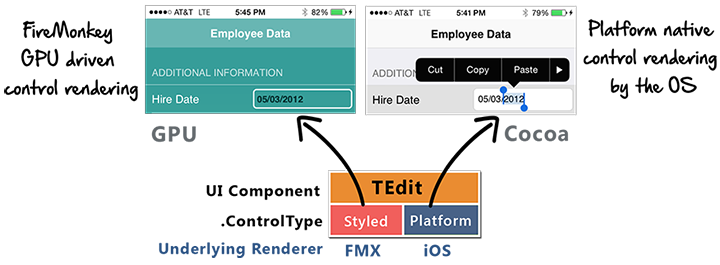
FireMonkey’s underlying visual control architecture enables multiple presentation implementations per control called “ControlTypes” - in particular, native OS control presentations can be utilised. The underlying architecture is MVC based and is backwards compatible enabling developers to choose at design time between Styled and Platform control types on a per control basis (for controls that include both control types). This allows you to select whether a control will be implemented at runtime by FireMonkey’s GPU driven rendering or implemented by the underlying operating system.
Because controls with a Platform .controltype use the same underlying implementation as native SDKs like Cocoa, your FireMonkey apps will have the smooth native scrolling and performance that end-users expect yet they use the same component properties, methods and events and are still cross-platform between OSes. This enables you to maintain complete cross-platform fidelity across Windows, Mac, iOS, and Android and deliver the best user experience possible. Find out more.
Learn how to make the most out of FireMonkey
Embarcadero has created a variety of blogs, tips and videos to help you gain a better understanding of how you can make the most out of the FireMonkey framework and its awesome capabilities.
FireMonkey styles to enhance Delphi app user experience
By applying the visually stunning FireMonkey and VCL styles with the TStyleBook component's collection of styles, you can create amazing-looking forms for your users. Here are some FMX Style examples from a blog by Muminjon:
FMX Style - Calypso
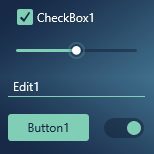
FMX Style - MaterialOxfordBlue
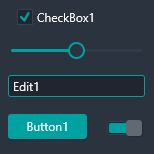
FMX Multi-Device Style – Material Patterns Blue
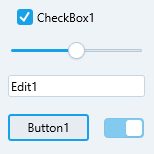
FMX Style – PuertoRico
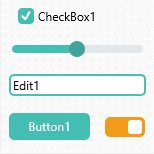
FMX Style – Stellar
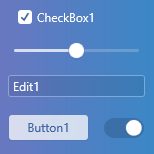
FMX Multi-Device Style – Ubuntu Clear Fantasy
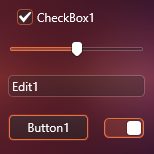
FMX Style – WedgewoodLight
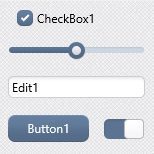
Learn more about the various FMX styles and benefits of FireMonkey by watching these videos:
- Customising Controls with FMX Styles, with Ray Konopka - discover how to leverage styles to customise individual controls as well as the entire user interface. Learn how to use the Style Designer to make your custom styles look their best.
- Native and Custom FireMonkey Styles - this video shows building a profile screen for your multi-device application using the FireMonkey framework with both native UI support and custom styling. Highlighted in the video are custom multi-device styles included in Embarcadero's premium style pack and custom styles from DelphiStyles.com.
- Useful Hints for Working with FMX Styles - In the CodeRage 2019 recording, Harry Stahl shows you how to get the most out of FMX Styles in RAD Studio.
- FireMonkey Multi-Device Design Live Q&A - Join CodeRage 2019 recording where Jim, Sarina, and some of the fantastic Embarcadero MVPs host a Q&A discussion all about FireMonkey.
- FireMonkey YouTube playlist - a collection of all the core FMX videos.
You can take a look at the FMX styles on the GetIt portal and download them right from within the IDE.
Animations, image and transition effects
Animations and effects are no longer just words you'd associate with the film and TV industry, with the rise of social media and more visually creative applications hitting the market, developers are having to step up their game to meet the expectations of the customers using their web, desktop and mobile applications. They want to be wowed and engaged.
Animations are complex. They can be started automatically or manually, with or without a delay, plus they can stop, start and go in reverse. FireMonkey has a range of animation subclasses that you can use for interpolations from a start value to an end value, interpolating through a series of values, as well as stepping through a list without interpolation.
With regards to image effects, the FireMonkey built-in ImageFX engine provides over 50 GPU-powered effects. These effects are nonvisual components that can be found in the Effects category on the Tool Palette. All the provided effects can be simply enabled or disabled by setting the Enabled flag from the Form Designer, or programmatically.
FireMonkey includes over twenty image transition effects, in which source pixels are progressively transformed into a target bitmap image, from simple fades to fancy banded swirls. The progress of the transformation is deterministic and can be set to an arbitrary percentage. This percentage can be animated to transition over time.
Find out more about the different animation, image effects and transitions you can do in this article by Anbarasan.
Top 9 FireMonkey How-To's
Hagpo Panosian has recently shared his most recommended how-to resources for FireMonkey that you can use to get the most out of the framework.
- Creating great UIs with C++Builder and FireMonkey: app templates.
- Powerful Delphi FireMonkey deployment manager tool.
- Customise the appearance of the FireMonkey list view.
- FireMonkey on Linux.
- Writing software for multiple platforms and architectures with FireMonkey.
- How to apply native controls in FireMonkey with Delphi and C++.
- First steps with FMXLinux.
- Learn how to select key entry types with the FMX.KeyboardTypes sample in RAD Studio for Android and iOS devices.
- How to clone FireMonkey Objects.
Find out more about Embarcadero
If Embarcadero Delphi or C++ is all new to you and you want to get started or try a free trial, or you're looking to move to a different product edition or new licences, we can help. Please head to our Embarcadero page where you'll find more information about the tools, free trials, our webshop and how you can contact our dedicated Embarcadero team.