
Copilot Chat vs Microsoft 365 Copilot
Blog|by Kieran Hollingsworth|19 February 2026
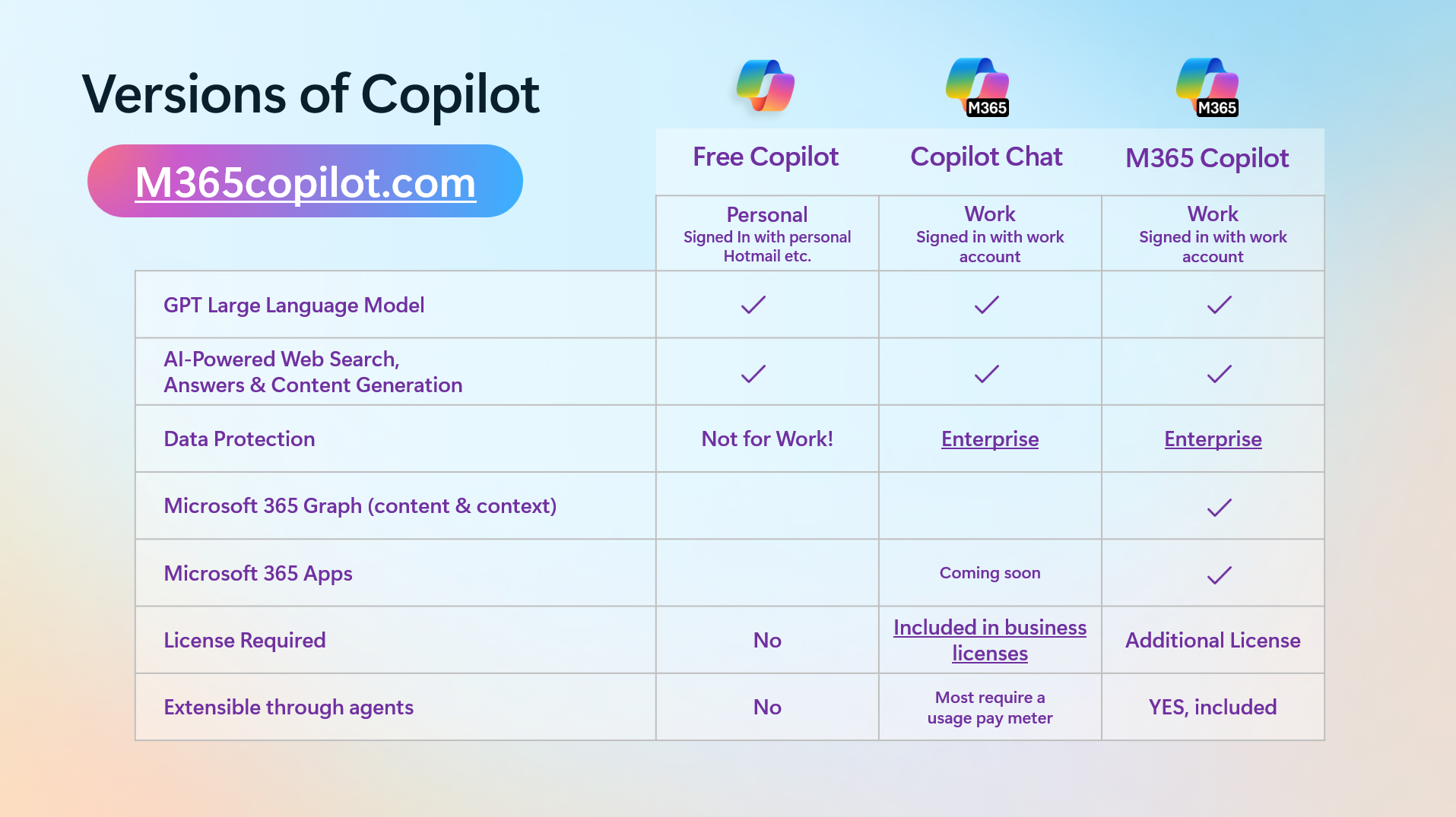
Microsoft’s ongoing Copilot business promotion gives businesses like yours the chance to bring AI into your everyday with up to 35% off. But did you know: Copilot Chat is already included in your Microsoft 365 business subscription.
Copilot Chat is a great tool for brainstorming, researching and getting quick answers all in a standalone chat window. But if you want a Copilot experience that's tailored to you, Microsoft 365 Copilot is where you can make a real difference.
How Microsoft 365 Copilot extends Copilot Chat’s capabilities
Copilot Chat is designed for everyday one-off questions. It helps you to get answers fast, to save you from trawling endless search results. It’s capable of reasoning over general knowledge and web content as well as your prompts within a standalone chat experience.
Microsoft 365 Copilot, on the other hand, offers a big upgrade - embedded across your Microsoft 365 tools and powered by WorkIQ for context-aware intelligence. Your emails, meetings, files, Teams chats and documents can all be considered by Copilot to provide more context-aware answers, reflecting what you’re actually working on.
This means, instead of the standard, generic responses you can expect from other AI tools, Microsoft 365 Copilot, you can expect answers to your prompts that actually answer your questions.
Why WorkIQ matters
WorkIQ is the unsung hero of Microsoft 365 Copilot – turning your Copilot from a simple assistant to a true work partner.
It interprets signals from your Microsoft tools, including Outlook, Teams, SharePoint, Word and more, learns your work patterns and provides more relevant, context-aware suggestions. For example, if you were to ask Copilot Chat about a specific campaign you’re running, it would be able to pull information from the internet but would miss the key context you’re looking for. Microsoft 365 Copilot would pull information from your internal communications and files to answer your question in a way that’s relevant to you.
It’s what makes Microsoft 365 Copilot feel more like a colleague than a tool, integrating with your Microsoft 365 tools and gaining a deep understanding of your ongoing projects, conversations and files.
Building Copilot agents
With your Microsoft 365 Copilot subscription, you can tap into both ready-made and custom Copilot agents, giving you the power to shape your Copilot around how your business truly works.
Whatever you want Copilot to help you achieve, agents make it personal.
You can build three types of agents, each designed for different scenarios:
- Prompt-and-response agents – e.g. an agent could be created to draft a LinkedIn post when prompted.
- Task agents – e.g. you could create an agent dedicated to carrying out singular tasks, like scheduling meetings, handling ticket intake, or qualifying leads by analysing data.
- Autonomous agents – these agents take action without waiting for a prompt and can be used to automate things like invoicing when criteria/events are met.
Whichever agent you choose, they give you the freedom to curate your Microsoft 365 Copilot experience to exactly what your business needs.
The verdict - what's the difference between Microsoft 365 Copilot Chat and Microsoft 365 Copilot Business?
Microsoft 365 Copilot takes action. Rather than simply providing quick answers, it can be used to automate many of the tasks you carry out day-to-day, freeing up your time for the valuable work that really drives your business forward. It’s customisable, secure, and integrates with your business applications, making it an invaluable tool.
And with Copilot usage analytics, you can see not only if your team are using Copilot, but how they’re using it so you can step in and offer guidance on how to make the most out of their Copilot licence.
Upgrade for less, before 31 March 2026
Until 31 March, you can upgrade to Microsoft 365 Copilot at the lowest price yet. Microsoft is offering up to 35% off Microsoft 365 + Copilot bundles, bringing enterprise-grade AI and robust security tools to your business at a massively reduced rate.
Want to learn more about the Copilot business promo? Fill out the contact form below to get started today.