
Improve R performance without modifying code
Blog|by Leanne Bevan|2 March 2022
Accelerate your R code with the Intel oneAPI Math Kernel Library
The R programming language and statistical computing
Various industries and sectors like finance, IT, e-commerce, manufacturing and healthcare use the R open-source programming environment to clean, analyse and graph statistical computing and design as it is robust and object-oriented (see www.r-project.org for more information). Taking a deeper look into the use of the language, one researcher found that over 20% of medical researchers use R for statistics, second to SPSS, and the researcher himself had a preference for using R as his chosen programming language for statistics.
Statistical computing is becoming more complex. It needs more power to process the mass of information as there is more statistical data readily available to analyse; plus, there is more demand from employers, clients and other parties who will use the data to make key decisions or better understand the state of the focus topic.
In this blog, we will show you how to boost the performance of R using the Intel oneAPI Math Kernel Library (oneMKL) using information from the article created by Khang Nguyen, Technical Consulting Engineer at Intel, as well as other research and information about R and details on how we can support you as an Intel Software Elite Reseller.
What is oneMKL?
oneMKL includes a collection of highly optimised, threaded, and vectorised functions for common mathematical operations that are used for scientific, engineering, and financial applications (Figure 1). It covers dense and sparse linear algebra (BLAS, LAPACK, PARDISO), fast Fourier transforms, vector math, summary statistics, splines, and much more. oneMKL runs optimised code for a given processor automatically without the need for branch code. It is also optimised for single-core vectorisation and cache utilisation. Finally, it automatically uses parallelism for multi-core CPUs and GPUs and scales some computations from single systems to clusters.
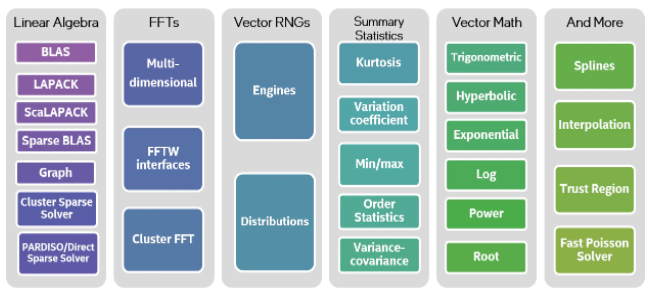
Figure 1: Mathematical domains covered by oneMKL
How to get the Intel oneAPI Math Kernel Library
oneMKL is part of the Intel oneAPI Base Toolkit. The Intel oneAPI HPC Toolkit is also required to link to R.
You can purchase both of these packages from Grey Matter with Priority Support. With Support, you have access to Intel Technical Consulting Engineers who will respond and resolve issues privately and work with Intel’s engineering teams as needed on solutions/workarounds to any technical issues, rather than going via open forums. You can find out more about the Intel oneAPI Toolkits and Priority Support on our Intel page.
Linking R to oneMKL
Linking R to oneMKL provides significant performance advantages, as we’ll see below, without requiring developers to change their R code. oneMKL is one layer underneath the R application. It works with the R engine to use appropriate oneMKL functions to improve performance. The oneMKL functions will automatically take advantage of hardware features in Intel processors like Intel Advanced Vector Extensions 512 (Intel AVX-512), Intel Advanced Vector Extensions 2 (Intel AVX2), and Intel Advanced Vector Extensions (Intel AVX). oneMKL is designed to allow you to focus on your applications without worrying about the underlying hardware. For example, a oneMKL application created on a system that supports Intel AVX will also take advantage of Intel AVX-512 if moved to a system that supports the later extensions.
Linking R to oneMKL is straightforward (see Quick Linking Intel MKL BLAS, LAPACK to R). Note that the following instructions are for Linux. Linking R to oneMKL will redirect appropriate R functions to optimised oneMKL functions; however, it is important to set certain oneMKL environment variables to work with R:

These environment variables set the MKL interface and threading layer to GNU and LP64. To verify that R is linked to oneMKL, run sessionInfo() from the R command prompt (Figures 2 and 3).
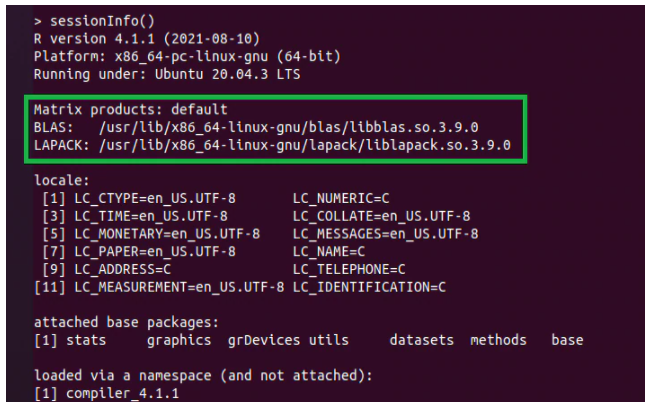
Figure 2: Output from sessionInfo() showing R without oneMKL
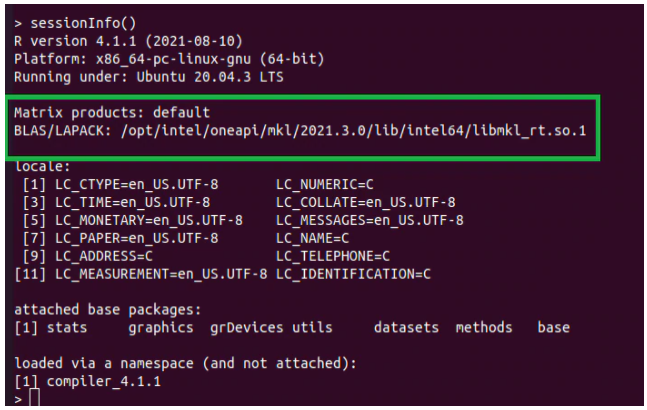
Figure 3: Output from sessionInfo() showing R using oneMKL
In general, R users don’t have to do anything more than simply link to oneMKL; however, there are a few things you can do to help:
- Although R is single-threaded, oneMKL can run in either single- or multithreaded mode. oneMKL uses multiple threads by default (i.e., the environment variable MKL_DYNAMIC=TRUE). This is usually best, provided there’s enough work to justify thread creation. In other words, oneMKL works best for large datasets.
- It is important not to oversubscribe the system (i.e., using more threads than available processors). The common practice is to set the number of threads equal to the number of cores in the system.
- This doesn’t always give the best performance if there isn’t enough work to saturate available resources. In this case, manually setting the number of threads can give better performance (e.g., setting the environment variables MKL_DYNAMIC=FALSE and MKL_NUM_THREADS=4).
- Disable hyperthreading in the BIOS.
- Set the environment variable MKL_VERBOSE=1 to see which oneMKL functions are being called and how many threads are being used.
The R Benchmarks (v2.5) are used to measure the performance improvement from linking R to oneMKL. The benchmark takes 27.9 seconds when R is not linked to oneMKL:

The benchmark takes 2.8 seconds when R is linked to oneMKL:

This is a 9.8x speedup just by linking R to oneMKL. No R code modifications were needed. Quite an improvement, right?
Next steps
If you're new to the R language, find out more about it here. There are also some additional resources to help you improve your data science and use of the R language here.
If you're ready to learn more about boosting your R code with oneMKL, contact our Intel licensing specialist to discuss the Intel oneAPI Toolkits in more detail. You can also take a look at our Intel oneAPI bitesize videos that we created in partnership with Bayncore.
Other resources
https://www.psychologicalscience.org/observer/why-you-should-become-a-user-a-brief-introduction-to-r