
What's new in Azure AI Services
Blog|by Mary Branscombe|14 May 2019

Microsoft has a wide range of AI tools and services, including two services on Azure; Azure Machine Learning Studio is a low code service where you build models in the drag-and-drop GUI and deploy them as web services with a REST API. The Azure Machine Learning Service also has a drag-and-drop interface if you want it but you can also work through the Python SDK. Underneath, it’s a managed cloud service for coding up machine learning systems with familiar development tools like Jupyter notebooks that lets developers deploy models in the cloud or in a container (including on an IoT device).
The automated machine learning in Azure Machine Learning uses your data to train multiple machine learning models using different algorithms and feature selections to find the one with the best training score. AutoML already works for classification and regression models, and now it covers forecasting as well. The training can now run on Azure Databricks, Cosmos DB or HD Insights (as well the existing targets of your local machine, remote VMs or compute on the Azure Machine Learning Service).
You can run AutoML from the Azure portal or using the Python SDK for the service; if you’re using the SDK, it now has a preview of options to help explain and interpret data models – helping developers understand why the model generates the results it does. The SDK exposes an explain API that can show what features and classes were significant, during training or inferencing, either globally for the whole data set or locally for a specific data point. You can use those to debug the model, to explain it to managers who have to sign off on the project before the machine learning system goes into production, or to help users of the system understand why the model suggested denying a credit application or predicted a failure.
Making it easier for data scientists to explain machine learning results to users and managers is one of the new features announced at Build 2019 that focus on helping organisations get machine learning out of development and into widespread use.
MLOps
The job of building a machine learning system isn’t finished when the model is built. It needs to be deployed and scaled in production, it needs to be monitored, and potentially retrained or updated; in other words, you need to think about development, deployment and operations like any other application.
Version management is particularly important for machine learning, from the various experiments data scientists perform to discover the features in their data sets, find which machine learning algorithms work best to get results from that data, and compare the accuracy of different training approaches. After deployment, you will need to check thatOa machine learning model is still the best tool for working with the data that’s arriving. It may be necessary to retrain or revert to an older model if the training gives poorer results. A model might also depend on the specific version of a library or framework.
Managing all this is key to getting the same quality of results from machine learning in production as in development, getting that same quality each time the model is deployed and being able to keep models up to date and useful.
The Azure Machine Learning Service now includes features for what’s come to be known as ‘MLOps’; this DevOps-style process of managing the machine learning lifecycle from adding the model to a registry to deploying and running it, monitoring it in production and collecting performance data to updating a deployment to use a new version – either as individual steps or through a CI/CD workflow.
You can now use Git repositories for managing your machine learning models, including through the Azure Pipelines tool in Azure DevOps, and you can version, profile and snapshot data to make sure different models train on the same data for accurate comparisons. You can package machine learning models to debug them locally, or create shared environments as Docker images to make it easier to get the same environment for training a model you’re testing, or to simplify handing a model over to the operations team. For QA, you can store sample queries to use for validating and profiling models to determine what CPU and memory they need for deployment. There’s also an audit trail option to track experiments and data sets used with any given model in the registry, so you can go back and see what code and data was used to create and train the model.
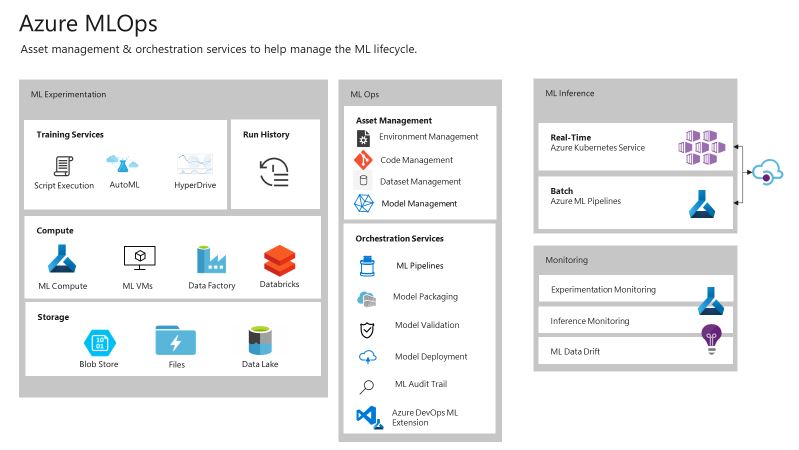
The new tools in Azure Machine Learning for MLOps
To make it easier to integrate these MLOps features with your existing automation tooling, the Azure command line interface now has an extension for working with the Azure Machine Learning Service. The CLI has commands for setting up the compute to train models on, running experiments, registering and deploying trained models, including profiling to determine hardware requirements.
For some models, a CPU won’t be enough to deliver the performance you need in production, and the announcements at Build included new options for running trained models.
Microsoft’s open source cross-platform library for integrating custom machine learning models into .NET applications, ML.NET, is now GA, as is the ONNX runtime for NVidia TensorRT and Intel nGraph. The Open Neural Network eXchange is a format that lets developers move models between different AI tools and frameworks, so you can start in, say, Caffe2 or PyTorch for experiments and then move the model to MXnet or Microsoft’s Cognitive Toolkit or even to iOS Core ML when it’s time to put it into production, without having to rebuild and retrain the model.
Being able to run those models with hardware acceleration from NVidia and Intel gives you much higher speed inferencing. And if you need even higher speeds, you can run some data models on the same FPGA hardware in Azure that Microsoft uses for building the Bing search index. The FPGA acceleration has been in preview and is now GA. It’s ideal for large amounts of data that demand low latency; CERN is using Azure FPGAs to do inferencing on data streamed from the Large Hadron Collider, handling 500TB of data a second.
The members of our Managed Services team are experts at understanding and managing Azure-related projects. If you need their technical advice or wish to discuss Azure and Visual Studio options and costs, call them on 01364 654100 or complete the form below.