
Get more done with Adobe Acrobat AI Assistant
News|19 February 2025
We’re all familiar with dealing with documents on Adobe Acrobat, but your workflows won’t be the same when you start using Adobe Acrobat AI Assistant.
Adobe is revolutionising the way we handle documents, making tasks faster, easier, and more efficient. Their Adobe Acrobat AI Assistant was even named a “Best Invention of 2024” by TIME Magazine.
There are many standout features, but here’s where we know they’ll make the biggest difference in your daily tasks.
Get the gist of the document right away
The Generative Summary feature automatically pulls key points from your documents, providing a concise overview. This is especially useful for lengthy contracts or reports, allowing you to quickly grasp the essential information without reading through the entire document.

Decode complex contracts and spot differences with ease
Understanding complex legal terms and spotting differences between multiple agreements can be challenging. The Contract AI feature simplifies this process by breaking down intricate language and highlighting key differences, making it easier to comprehend and compare contracts.
Quickly analyse and compare multiple documents for deeper insights
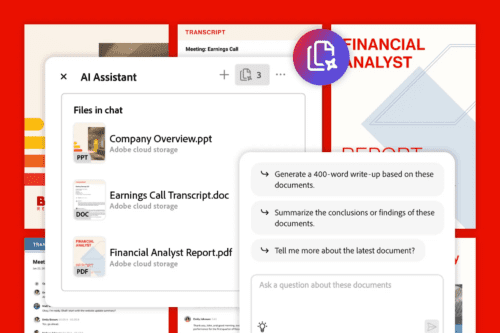 The AI Assistant can analyse multiple documents simultaneously, uncovering similarities, differences, and key patterns. This feature is invaluable for research and analysis, saving you time and effort by providing comprehensive insights across various files.
There's so much more you can do with Acrobat AI Assistant. By automating routine tasks and providing intelligent insights, it allows you to focus on what truly matters. Whether you’re a student, a professional, or a business owner, Adobe makes it easier to turn documents into actions.
Use Adobe AI Assistant with confidence and security
Adobe ensures that your documents and data remain secure. You have full control over permissions and team access to Acrobat AI Assistant via the Adobe Admin Console.
These AI features are developed in alignment with Adobe’s AI ethics. The AI Assistant does not use your content to train Adobe’s generative AI models, maintaining the privacy and confidentiality of your information.
Additionally, Acrobat and Acrobat AI Assistant meet compliance standards for SOC2, SOC3, ISO, BSI C5, CJIS, and FedRAMP Tailored. These certifications demonstrate Adobe’s commitment to maintaining the highest levels of security and compliance, giving you peace of mind that your data is protected.
Enhanced accessibility for all users and thinkers
The AI Assistant helps make documents more accessible by breaking down complex language into simpler terms. This feature is particularly beneficial for users with disabilities, ensuring that everyone can understand and interact with the content.
Seamlessly integrate with your office software
Adobe Acrobat AI Assistant seamlessly integrates with other productivity tools, such as Microsoft Teams and Zoom. This allows you to get quick answers and summaries from meeting transcripts, enhancing your workflow and collaboration.
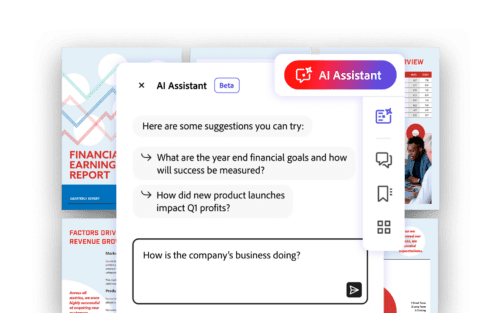
Get the exact data you’ve been searching for
You can make specific requests, such as highlighting differences between PDF contracts or extracting information from tables.
The AI Assistant also suggests follow-up questions based on your initial query, providing a more interactive and thorough understanding of your documents.
Access your Acrobat AI Assistant anytime on any device
The AI Assistant is available on both iOS and Android devices, ensuring that you can access its powerful features wherever you are. This mobile accessibility makes it easier to manage documents on the go.
Adobe Acrobat AI Assistant is packed with features that enhance productivity, security, and accessibility. By leveraging these capabilities, you can streamline your document management processes and focus on what truly matters.
Simplify your work life. See what Adobe can do for you.
Whether you're dealing with complex contracts, lengthy reports, or everyday documents, the Acrobat AI Assistant is your go-to tool for efficient and effective document handling.
Speak with our experts to explore your licensing options today.