
How to set up HERE Platform usage alerts
Blog|by Jamie Carruthers|14 August 2025
Step-by-step: setting up HERE usage alerts
A new feature has landed in your HERE Platform realm, usage alerts. It’s designed to help you track service consumption, avoid unexpected costs, and make smarter decisions.
When you now log in, you’ll see a notification banner introducing the feature.
HERE usage alerts let you set thresholds for specific services and receive email notifications when those limits are reached. It’s a simple, effective way to monitor HERE API usage and stay ahead of your billing.
Step 1: Open Alerts Dashboard
Navigate to the alerts dashboard

Click the Launcher (three horizontal lines, top right), then select Usage and go to the Alerts tab.
Step 2: Create a new alert
Click the plus icon to begin. Give your alert a clear, relevant name, this will appear in the email notification, so make it meaningful
Tip: Use a naming convention that reflects the service, threshold, and purpose.
For example:
- RasterTile_Usage_2M_Limit
- Geocoding_Alert_80%Threshold
- FleetApp_OverageWarning_July2025
This makes it easier to identify alerts at a glance and track usage trends over time.
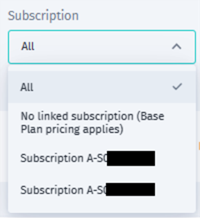
You can choose whether to track usage by subscription or by a specific app ID.
Extra tip: To find app IDs linked to a subscription, head to Access Manager and use the subscription dropdown.
Step 3: Set your usage threshold
Enter the threshold that should trigger an alert. For example, if your asset commitment is 250 and each asset allows 8,000 transactions, your total allowance is 2 million. Set your alert accordingly.

Step 4: Add multiple thresholds (optional)
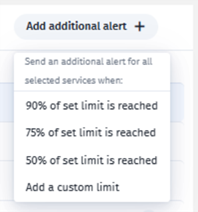
Want to be notified at different stages? Click the plus icon to add additional limits for example, 1.5 million and 2 million.
You can also set percentage-based alerts. Just click Add additional alert and choose a percentage.
Step 5: Choose your recipients
Scroll down and add email addresses or a webhook. You can enter any email, or select users with realm access from the dropdown.
Click Save to activate your alert.
Step 6: Monitor and manage your alerts
Your alerts will appear in a list, where you can edit or delete them. The Alert activity section shows when alerts were created and triggered.
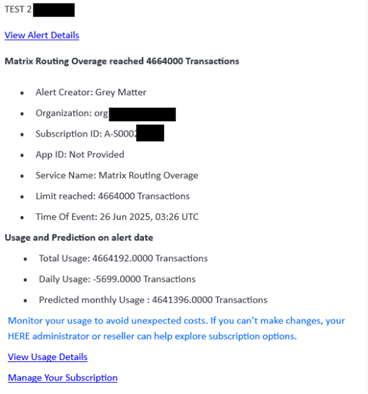
When an alert is triggered, recipients will receive an email with:
- The alert name
- The limit reached
- The date it was reached
- Predicted usage for the month
Tips for effective HERE usage monitoring
- Use consistent naming conventions to simplify tracking.
- Set multiple thresholds to catch overages early.
- Review alert activity regularly to spot trends.
- Link alerts to app IDs for granular control
Further supporting information on the technical process of implementing data usage alerts can be found HERE
Let's build on it
We work with developers, planners, and product teams to embed HERE’s traffic intelligence into the tools they already use. From API onboarding to custom dashboards, we help you move from data to action, fast.
Want to get more out of your HERE package then let's talk?